
Connect your WhatsApp Business to Claude.
Add Atmet Chat to Claude and run your WhatsApp Business by chat: see who is waiting, answer customers, label chats and send campaigns (campaigns go out on the official WhatsApp Business Platform). Claude asks you before anything is sent.
$9.99 a month per WhatsApp number · Included in Ultra for stores and Pro and Ultra for businesses
Last updated: 28 November 2026
Add Atmet Chat to Claude
Atmet Chat isn’t in Claude’s directory yet, so you add it as a custom plugin, with the address below. It takes three steps, once.
Before you start
You need an Atmet Chat account with a WhatsApp number connected. Already on Atmet Chat (stores on Ultra, businesses on Pro and Ultra)? You have one: the steps are also on Integrations in your dashboard. New? Sign up first: 3 days free, no card.
Open Plugins in Claude
In Claude, open Plugins in the sidebar (or + › Plugins › Manage plugins).
Add a custom plugin
Add a custom plugin named Atmet Chat with the address https://mcp.atmet.app/mcp.
Sign in and allow
Connect it: sign in to Atmet Chat when asked, then press Allow. Claude can now use your account.
The address to paste
https://mcp.atmet.app/mcpOn a Team or Enterprise plan, an owner adds it first, in the organization’s settings. Each member then finds it in Plugins and connects it.
Anthropic’s help page, checked 26 November 2026 (it still calls plugins connectors)
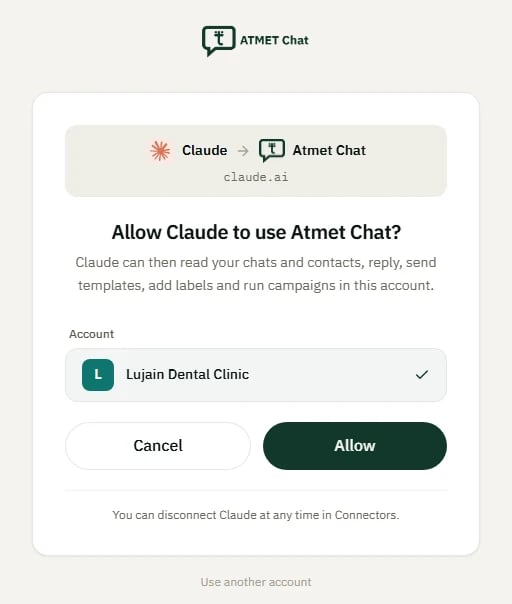
The screen you see once, after signing in. The account name is an example.
Which Claude plans can use it?
Custom plugins work on Claude’s Free, Pro, Max, Ultra, Team and Enterprise plans, on claude.ai and in Claude Desktop. On Free you can add one custom plugin. Source: Anthropic’s help page, checked 26 November 2026 (Anthropic’s help pages still call these connectors).
Your Claude plan is separate from Atmet Chat: Anthropic bills Claude, and Atmet Chat is billed on its own.
Will Claude send messages without asking?
Claude asks for your approval when it wants to use a tool. Atmet Chat’s tools that send a WhatsApp message are marked as sending, and they tell Claude to confirm the recipient and the wording with you first.
A campaign goes further: it starts only with the exact number of people you confirmed, and Atmet Chat tells Claude when it will finish before you agree.
Anthropic advises clicking “Allow always” only for a server and tool you trust to run unsupervised. For the tools that send, keep the question on.
What you can ask Claude
Type it the way you would say it. Claude picks the Atmet Chat tools it needs, and shows you each one as it uses it.
Which customers are still waiting for a reply today?
What happens
Lists the chats waiting for an answer, newest first, with what each customer asked.
list_conversationsget_conversationRead my chat with Sarah and draft a reply about her delivery date.
What happens
Reads the chat, drafts the reply, and sends it only once you approve the wording.
get_conversationsend_messageLabel every chat that asked about wholesale this week as “Wholesale”.
What happens
Searches this week’s chats, creates the label if you don’t have it, and labels each one.
list_conversationscreate_labelset_conversation_labelsSend our weekend offer template to the customers in this list.
What happens
Prepares a draft campaign, tells you who was left out and when it would finish, and starts only after you confirm the exact number of people.
list_templatescreate_campaignstart_campaignHow is yesterday’s campaign doing?
What happens
Reports how many messages were sent and delivered, what failed and why, and when it should finish.
get_campaignWhich abandoned carts from this week were never reminded, and why?
What happens
Lists the week’s carts with where each one stands and the reason a reminder was skipped. For stores.
list_abandoned_carts
What Claude can see and do
- The Atmet Chat account you pick on the Allow screen, and the WhatsApp numbers connected to it. Nothing else.
- One Allow covers reading your chats and contacts, replying, sending templates, adding labels and running campaigns. Stores add their orders and abandoned carts, read-only.
- What it reads or sends shows in the activity log on Integrations (or AI apps on mcp.atmet.app), kept 90 days, without the message text.
- You can disconnect it there at any time, and its access ends at once. Your chats, templates and campaigns stay as they are.
If something doesn’t work
- It says no WhatsApp number is connected: connect one first, on the WhatsApp page of your dashboard or of mcp.atmet.app.
- It says your plan doesn’t include the connection: the trial ended or the plan is below the one that has it. Upgrade or subscribe, and it works again with no new sign-in.
- It can’t send a reply: a free-text reply goes within 24 hours of the customer’s last message on the official platform, or 3 days on the Atmet Chat channel. After that, on the official platform ask it to send an approved template instead; on the Atmet Chat channel alone, the customer has to write first.
- It refuses a number: that customer is on your do-not-message list.
- The sign-in page says the request expired: it lasts 15 minutes, so start again from the app.
The full setup guide: every tool and its limits →Everything about Claude and ChatGPT →
Atmet Chat is made by Atmet. It is not made, sponsored or endorsed by Meta, WhatsApp, Anthropic or OpenAI. WhatsApp is a trademark of Meta, Claude of Anthropic, and ChatGPT of OpenAI.
Questions about Atmet Chat in Claude
What owners ask before they connect.
Not yet. Until it is, you add it as a custom plugin with its address, which works the same way once it is added.
Yes. Anthropic lets Free accounts add one custom plugin (its help page, 26 November 2026). Atmet Chat itself is $9.99 a month per WhatsApp number after a 3-day free trial, or included if you are on Ultra (stores) or Pro and Ultra (businesses).
Claude Desktop uses the plugins of your Claude account. Claude Code, like any agent that supports MCP, takes the same address, https://mcp.atmet.app/mcp, and signs in the same way.
Yes. Paste or share the list in the chat and Claude passes the names and numbers to Atmet Chat, up to 2,000 people per campaign. Atmet Chat leaves out invalid numbers, duplicates and anyone on your do-not-message list, and tells you who.
No. Claude acts when you ask it. For an AI that answers your customers around the clock, see the Atmet Chat AI agent, from Pro.
The AI agent →Run your WhatsApp from Claude
Sign up, connect your WhatsApp number and add Atmet Chat to Claude. 3 days free, no card.
A question? Contact us